
ATS-Friendly CV Format: What to Include & Avoid
An ATS-friendly CV format uses a single-column layout, standard section headings, and clean, readable fonts like Arial or Calibri. It avoids headers, footers, text boxes, and images that confuse applicant tracking systems. To rank high in recruitment software, mirror target keywords naturally from the job description and save your file as a text-based PDF or…

Share:

ATS-Friendly CV Format: What to Include, What to Avoid
An ATS-friendly CV format uses a single-column layout, standard section headings, and clean, readable fonts like Arial or Calibri. It avoids headers, footers, text boxes, and images that confuse applicant tracking systems. To rank high in recruitment software, mirror target keywords naturally from the job description and save your file as a text-based PDF or DOCX.
Table of Contents
Applying for jobs can feel like sending your applications into a black hole. You polish your credentials, hit submit, and wait—only to receive an automated rejection email hours later. In most modern recruitment workflows, an Applicant Tracking System (ATS) is the first filter your resume encounters.
An Applicant Tracking System (ATS) is recruitment software that helps employers collect, sort, scan, and rank job applications. If the ATS cannot parse or read the text in your CV, key details about your experience can get lost or mangled. This guide breaks down exactly what to include, what to avoid, and how to structure an ATS-compatible CV that passes automated screens and compels human recruiters to schedule an interview.
How ATS Software Actually Works (Myths vs. Reality)
Before diving into layout and keywords, it is essential to clear up common misconceptions about automated hiring tools.
- Myth: ATS software automatically rejects 75% of CVs without a human ever looking at them.
- Fact: An ATS primary function is to serve as an organized database for recruiters. Automated rejections usually occur because a candidate fails explicit, employer-set knockout questions (such as legal work authorization or required certifications) rather than a software algorithm randomly discarding files.
- Myth: You should hide invisible white keywords in your document footer to fool the system.
- Fact: Modern ATS parsers strip formatting and display plain text directly to the recruiter. Hidden text often appears as unformatted junk text at the end of your parsed file, raising immediate ethical red flags and causing instant rejection.
- Myth: You must use a boring plain-text document (.txt) for ATS compliance.
- Fact: Modern applicant tracking systems handle text-based PDF and DOCX files without issues. You do not need to sacrifice visual appeal entirely; you simply need a clean layout.
What to Include in an ATS-Friendly CV
To ensure your professional history parses accurately, structure your document using conventional categories and clear formatting.
+-------------------------------------------------------------------+
|                        YOUR FULL NAME                             |
|           City, Country | Phone Number | Professional Email       |
|                     LinkedIn Profile URL                          |
+-------------------------------------------------------------------+
| PROFESSIONAL SUMMARY                                              |
| Concise 3-4 sentence overview incorporating core target keywords. |
+-------------------------------------------------------------------+
| WORK EXPERIENCE                                                   |
| Job Title | Company Name | Location | Month Year – Month Year     |
| • Action verb + task + measurable result (e.g., increased by 20%) |
| • Contextual inclusion of key skills from job posting             |
+-------------------------------------------------------------------+
| EDUCATION                                                         |
| Degree Name | Major | University Name | Graduation Year           |
+-------------------------------------------------------------------+
| SKILLS & CERTIFICATIONS                                           |
| Hard Skills | Technical Tools | Industry Credentials             |
+-------------------------------------------------------------------+
1. Standard Section Headings
ATS software relies on recognizable headings to categorize your information. Stick to traditional terms that match the system’s programming:
- Use “Work Experience” or “Professional Experience” instead of “Where I’ve Been”.
- Use “Education” instead of “Academic Background”.
- Use “Skills” or “Core Competencies” instead of “My Strengths”.
2. Contextual Keywords from the Job Description
Keyword matching is central to how ATS search filters operate. Extract core hard skills, software names, and job qualifications directly from the target job description and integrate them naturally throughout your experience bullet points.
If a job posting calls for “Project Management,” write out the full term alongside common abbreviations like “PMP” to cover all search query variations.
3. Clear, Standard Contact Information in the Body Text
Always place your full name, location (City, Country), phone number, email address, and LinkedIn link in the main body of the document. Many ATS parsers overlook or completely ignore text placed inside header and footer regions of a page.
4. Simple, Web-Safe Typography
Choose standard, clean fonts sized between 10 pt and 12 pt for body text, and 14 pt to 16 pt for headings. Proven options include:
- Arial
- Calibri
- Helvetica
- Georgia
- Times New Roman
What to Avoid in an ATS-Friendly CV
Certain design features create parsing errors, causing relevant skills to be dropped or assigned to incorrect fields.
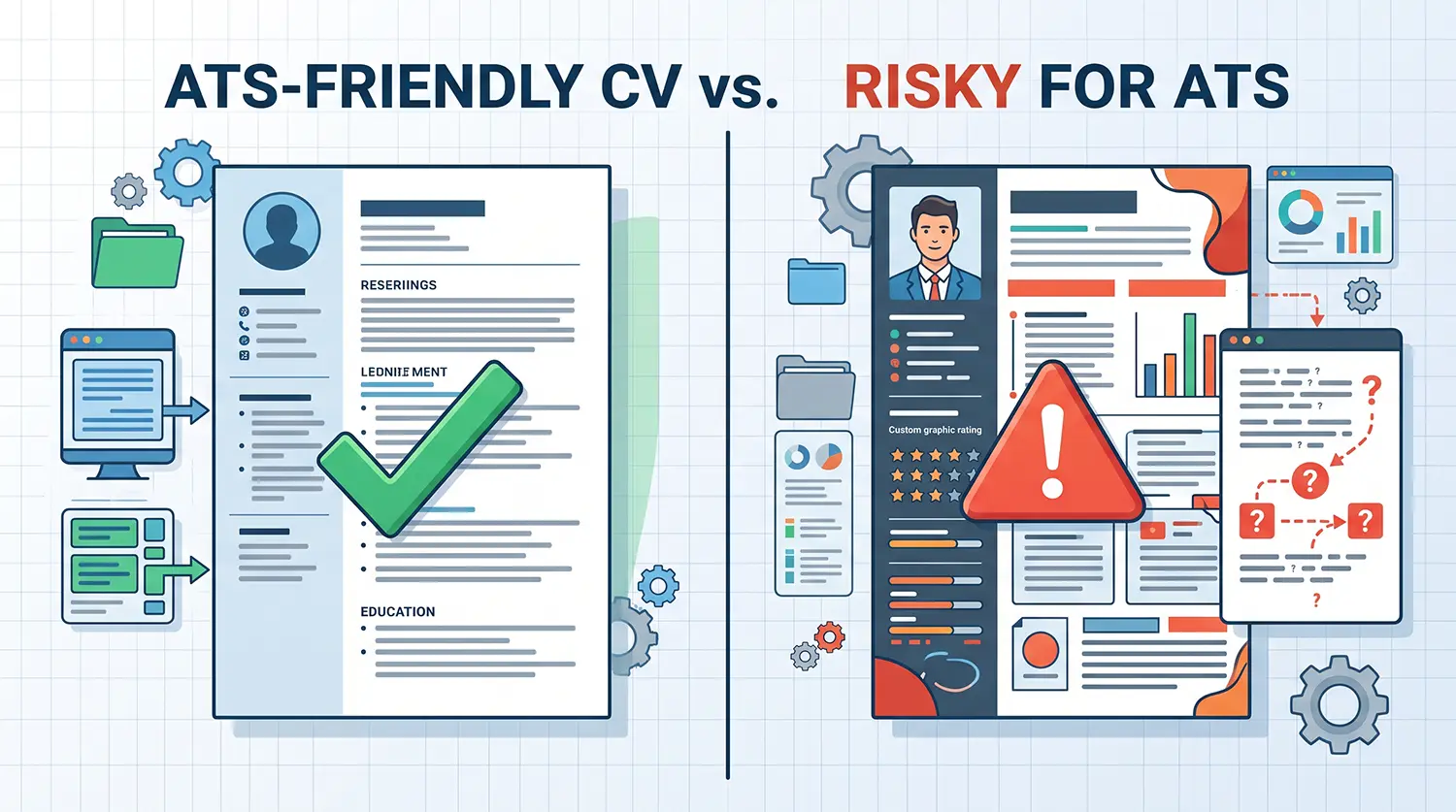
1. Multi-Column Layouts, Tables, and Text Boxes
While multi-column templates look stylish, ATS readers process text in a linear left-to-right, top-to-bottom order. Multi-column layouts or tables can cause the parser to read across columns, scrambling sentences into unreadable fragments.
2. Graphics, Charts, and Rating Bars
Never use progress bars or visual ratings to represent your skill proficiency (e.g., “Python: 4/5 stars”). An ATS cannot interpret images or graphic elements; it only reads text. Skill progress bars take up valuable room without providing search term value.
3. Headshots and Unnecessary Personal Data
In countries such as the United States, United Kingdom, and Canada, including a photo on your CV is discouraged due to anti-discrimination hiring policies. Images cannot be parsed by an ATS and waste document space. Additionally, avoid detailing personal information like marital status, date of birth, or exact street address unless specific local regulations require it.
Formatting Comparison: ATS-Safe vs. High-Risk Elements
The table below outlines common CV design choices and their compatibility with applicant tracking systems:
| CV Feature / Element | Formatting Risk Level | ATS Parsing Impact | Safe Alternative |
| Single-Column Layout | 🟢 Low Risk | Parses cleanly in linear top-to-bottom sequence. | Standard single-column alignment. |
| Text Tables & Boxes | 🔴 High Risk | Frequently causes missing, garbled, or misordered text. | Use bulleted lists and tab stops. |
| Header/Footer Text | 🔴 High Risk | Over 25% of systems fail to extract text from headers. | Move contact info into the main page body. |
| Graphics & Progress Bars | 🔴 High Risk | Inaccessible to text parsers; ignored entirely. | List skills as plain text terms. |
| Standard Fonts (Calibri, Arial) | 🟢 Low Risk | Uniform text conversion across all software versions. | Stick to pre-installed system fonts. |
| Custom Graphic Icons | 🟡 Moderate Risk | May convert into weird symbol characters. | Use standard circular bullet points. |
| Text-Based PDF / DOCX | 🟢 Low Risk | Highly readable by modern recruitment software. | Export clean document files directly from text editors. |
Before & After: Rewriting CV Bullets for ATS & Human Readers
An ATS checks for contextual keywords, but a human recruiter evaluates impact and results. Your bullet points must satisfy both audiences.
Example 1: Digital Marketing Role
- Weak (Generic & Keyword-Poor):“Responsible for managing social media accounts and doing online advertising campaigns.”
- Strong (ATS-Optimized & Action-Oriented):“Managed paid digital marketing campaigns across Google Ads and Meta Ads, increasing qualified lead generation by 34% within six months while managing a $15,000 monthly budget.”
Example 2: Customer Support Role
- Weak (Generic & Keyword-Poor):“Answered phone calls and helped customers with their account problems.”
- Strong (ATS-Optimized & Action-Oriented):“Resolved client inquiries using Zendesk ticketing software, maintaining a 98% Customer Satisfaction (CSAT) score across 120+ weekly support requests.”
Responsible Use of AI in CV Writing
Artificial intelligence tools can significantly streamline the resume writing process. However, maintaining honesty and accuracy remains critical.
- What AI Should Do: AI support is excellent for refining wording, fixing grammatical errors, formatting experience into active bullet points, and highlighting missing keywords from a job posting. If you need help polishing your wording, utilizing an AI-powered CV review tool can help pinpoint weak descriptions and formatting errors before you submit.
- What AI Should NOT Do: Never use AI to invent job titles, fabricate work achievements, or add technical skills you do not possess. Misrepresenting your background creates immediate ethical breaches that surface quickly during technical assessments or interviews.
The Ultimate ATS Readiness Checklist
Run through this final checklist before submitting your job application:
- [ ] File Format: Is your document saved as a text-based PDF or DOCX file? (Avoid image-based PDFs, JPGs, or PNGs).
- [ ] Contact Info Placement: Are your phone number, email, and location inside the document body rather than in a header/footer?
- [ ] Layout Simplicity: Did you use a single-column layout without tables, text boxes, or columns?
- [ ] Section Titles: Are all headings standardized (e.g., “Work Experience”, “Education”, “Skills”)?
- [ ] Keyword Match: Have you incorporated specific keywords, tool names, and qualifications directly from the job advertisement?
- [ ] No Graphics: Have you removed photos, logos, skill charts, and custom icons?
- [ ] Plain Text Test: Can you copy and paste the text out of your document cleanly into Notepad or a plain-text editor without missing or jumbled words?
Frequently Asked Questions
Is a PDF file ATS-friendly?
Yes, modern Applicant Tracking Systems parse text-based PDF files accurately. As long as your PDF is generated directly from a word processor or CV builder (rather than a scanned paper document or flattened image), the ATS can extract the text seamlessly. However, if a job application explicitly specifies DOCX, follow the requested file format.
How long should an ATS-friendly CV be?
An ATS can process documents of any length without penalties, but human recruiters still prefer conciseness. Aim for one page if you have less than five years of experience, or two pages for mid-to-senior professionals. Keep content focused strictly on metrics and relevant qualifications.
Should I tailor my CV for every job application?
Yes, tailoring your CV for each target role significantly improves your keyword match rate. Review the job description, identify critical skills or required tools, and weave those exact terms into your professional summary and work history bullet points.
Can an ATS read graphics or skill bar meters?
No, recruitment software cannot read images, charts, or visual progress bars. Visual skill meters are completely unparsed by the system and waste valuable real estate on your page. Always write out your skills as plain text terms.
What happens if I use a two-column CV format?
Two-column layouts can confuse parsing software, leading it to read across lines horizontally rather than vertically down each column. This can scramble your employment dates, job titles, and job descriptions into an unreadable state inside the employer’s database. Stick to a clean single-column structure for maximum compatibility.
Conclusion
Creating an ATS-friendly CV does not mean sacrificing quality or design; it means presenting your career history in a clean, linear, and keyword-rich structure that software can easily process. By sticking to standard headings, avoiding complex tables and text boxes, and tailoring your experience bullet points to match the target job description, you ensure your CV passes automated screens and reaches human hiring managers.
Ready to build an application that stands out to both recruiters and scanning software? Create your ATS-friendly CV step by step with CV Maker You.